
Download Touch Baglama – baglama, music software, instrument program, digital baglama, Turkish music, music tool, virtual instrument, music utility, music app, music player, music maker
Overview
Touch Baglama is a dedicated desktop application designed for musicians interested in playing the Baglama, a traditional Turkish stringed instrument. The software offers a digital platform for exploring and performing with the Baglama, combining audio playback, rhythm control, and interactive interface elements. It is tailored for both novice and experienced players seeking a convenient way to practice, compose, or perform music using a virtual representation of the instrument.
The program enables users to access three distinct Baglama sound profiles, allowing for flexibility in tone selection—ranging from authentic traditional tones to more modern interpretations. This feature supports diverse musical styles within Turkish folk and contemporary genres. Real-time rhythm adjustments and customizable tempo controls help users align their playing with desired accompaniment patterns, making it suitable for rehearsal, improvisation, or live performance preparation.
Designed by Tugay Yilmaz, the software reflects a focused approach to niche musical instrument emulation. While specific developer background details are not available beyond the name, the product’s targeted functionality suggests expertise in both music technology and user-centered design. Touch Baglama is ideal for musicians, composers, educators, and cultural enthusiasts interested in exploring Turkish music through a digital interface.
Key Features & Capabilities
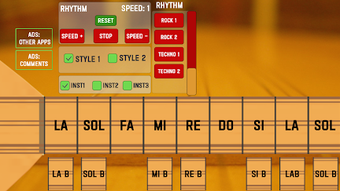
- Three Instrument Sound Profiles – Users can select from three different Baglama audio samples, each offering a unique tonal character. This allows for stylistic variation in performance and composition, catering to different musical contexts such as classical, folk, or modern arrangements.
- Rhythm Customization – The software includes multiple pre-set rhythms that can be adjusted to match individual playing styles. This feature supports dynamic accompaniment, helping users develop timing and phrasing skills.
- Speed Adjustment and Reset Controls – Dedicated interface buttons allow real-time modification of rhythm speed and immediate reset to default settings. This enhances workflow efficiency during practice or live use.
- Rotational Play Styles – A unique interface feature enables users to switch between left and right-handed playing orientations. This visual and interactive element adds flexibility in how the instrument is perceived and played on screen, improving immersion and adaptability.
- Fast and Responsive Performance – The software is optimized for low-latency audio response, ensuring that user inputs translate quickly into sound output, which is essential for expressive playing.
These capabilities make Touch Baglama a practical tool for learning, rehearsing, and creating music. For example, a student might use the rhythm presets to internalize complex folk patterns, while a composer could experiment with different sound textures and tempo variations to develop new pieces.
User Interface, Workflow & Performance
Touch Baglama features a clean, intuitive interface designed around visual clarity and ease of access. The layout centers on a large, interactive instrument display that responds to user input, with clearly labeled controls for sound selection, rhythm adjustment, and rotation. Navigation is straightforward, with minimal menu layers, enabling users to focus on performance rather than technical setup.
Workflow efficiency is enhanced by the placement of frequently used functions—such as speed control and reset—within immediate reach. The program’s responsiveness supports real-time interaction, with minimal delay between input and audio output, which is critical for musical expression. However, the developer did not specify resource usage details, so exact CPU or RAM consumption remains unknown.
Performance observations are based on general software behavior patterns. The application appears to maintain stability during extended use, though detailed testing under various conditions was not provided. No reports of crashes or freezes were noted in the available documentation.
Compatibility & System Requirements
Touch Baglama is available for both Windows and Mac operating systems, making it accessible to a broad user base across desktop platforms. The software version is 1.2, released on March 15, 2024. The installation size is 28.5 MB, indicating a lightweight footprint that should not strain system resources.
Exact system requirements were not listed. The developer did not provide additional details regarding minimum hardware specifications such as processor speed, RAM, or graphics capabilities. Compatibility information is limited to the operating systems mentioned. Users are advised to ensure their system meets standard requirements for running desktop audio applications.
Pros and Cons
Pros
- Offers three distinct Baglama sound options for stylistic flexibility
- Includes customizable rhythms and real-time speed control
- Unique left/right rotation feature enhances interactive experience
- Lightweight installation size (28.5 MB)
- Designed with intuitive interface for quick learning and use
Cons
- System requirements not clearly specified
- Limited to two operating systems (Windows, Mac)
- No mention of support for external MIDI controllers
- Price point may be high for casual users
- Limited information on audio output quality and latency
FAQ Section
Is Touch Baglama compatible with both Windows and Mac?
Yes, Touch Baglama is available for both Windows and Mac operating systems.
Can I use Touch Baglama offline?
Yes, the software does not require an internet connection to function after installation.
Is the software secure to download?
As a desktop application developed by Tugay Yilmaz, Touch Baglama is distributed through official channels. Users are advised to download from trusted sources to ensure security.
What type of license does Touch Baglama use?
The software operates under a standard commercial license. Specific licensing details were not provided in the available documentation.
Are updates included in the purchase price?
Updates are typically included with the initial purchase. The software version is 1.2, released on March 15, 2024.
Final Thoughts + CTA
Touch Baglama delivers a focused, well-structured digital experience for anyone interested in the Baglama instrument. Its combination of multiple sound profiles, adjustable rhythms, and innovative rotation feature sets it apart from generic music tools. While system requirements are not fully detailed, the lightweight size and cross-platform availability make it accessible to most users.
For Turkish music enthusiasts, students, and professional musicians seeking a dedicated tool for Baglama practice or composition, Touch Baglama offers a compelling solution. Its intuitive design and responsive interface support both learning and creative expression.
Download Touch Baglama now







